
How the sale map works
For shoppers
How do I find sales?
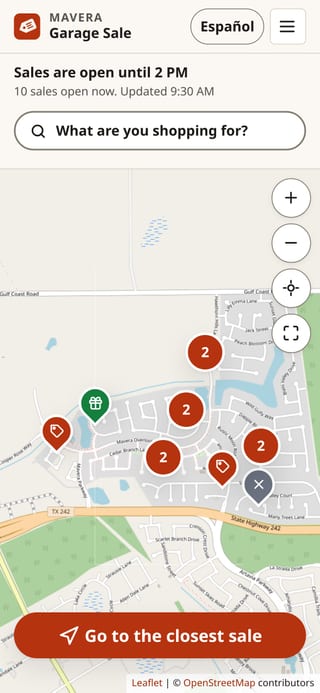
Open the map. Every pin is a house with a garage sale. Tap a pin to see what they have and when they're open, then tap Get directions.
How do I see only what I want?
Tap "What are you shopping for?" at the top of the map and pick things like Baby & kids or Tools. The map then shows only the sales that have them.
What does "Go to the closest sale" do?
It finds the closest sale you haven't been to yet and shows it on the map. When you're done there, tap Next closest sale on its card (or the big button again): it marks that sale as visited and finds the next one.
What do the pins mean?
A red tag pin is open. A white pin with a clock opens later today. A green gift pin has free stuff at the curb. A gray pin with an X is closed. A white pin with a check mark is one you've already visited (only your phone remembers that). A red circle with a number is several sales close together: tap it to zoom in. A white pin with a dashed edge and an ! means two neighbors reported it may be closed or not a real sale.
Do I need to download an app?
No. This is a website, so it works in the browser on any phone. Directions open in your phone's maps app.
For sellers
How do I add my sale?
Tap Add your sale, move the map until the pin is on your house, pick what you're selling, and tap Put my sale on the map. It takes about a minute.
How do I mark my sale closed, or put leftovers out for free?
Open your private link (or open the map on the same phone and tap My sale) and pick Closed or Free at the curb. The map updates for shoppers within a couple of minutes.
I lost my private link. What now?
If you're on the same phone, open the map and tap My sale. If not, email the organizer (the address is at the end of this page) with your street and house number, and you'll get a new link. Please don't add your sale again: that puts a second pin on your house.
What do you keep about me?
Only what you type into the form, where your pin is, and a scrambled code made from your internet address (to stop spam). No name, no phone number, no account. Everything is deleted shortly after 4 PM on sale day.
Why did my pin disappear at 2 PM?
The sale ends at 2 PM. From then until 4 PM, only sales marked Free at the curb show on the map. Pick Free at the curb on My sale if you put leftovers out.
Do I need to take my sale down afterwards?
No. Every sale is deleted automatically shortly after 4 PM on sale day.
About this map
Who runs this?
Brandon, a Mavera neighbor just trying to make the neighborhood a better place. It isn't run by the HOA.
I see a fake or wrong sale.
Tap the pin, then tap Report a problem. The organizer checks every report.
Parking
Please park along the street and keep driveways, mailboxes and fire hydrants clear. Watch for kids, and drive slowly.
Still stuck? Email brandon@maverasale.com.